Agentic AI
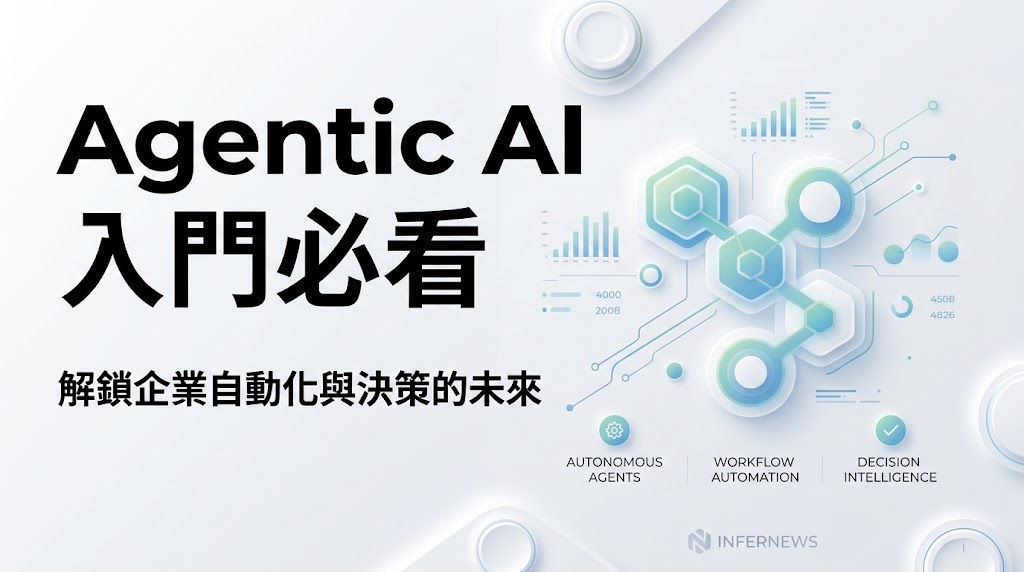
AI Agent 實戰指南:從 LLM 到 Agent
導讀:不要只停留在提示詞工程(Prompt Engineering)!AI Agent(人工智慧代理)是具備「目標拆解、環境感知、工具調用、記憶檢索與自主決策」的智慧系統。
一、什麼是 AI Agent?它與傳統 Chatbot 有何本質差異?
傳統的大語言模型(LLM)就像一個「離線的大腦」,只能被動根據輸入的 Prompt 產出文字。而 AI Agent 是以 LLM 為決策核心,為其配備了記憶(Memory)、感官與工具(Tools/APIs)以及規劃能力(Planning)的自主實體。
| 評估維度 | 傳統 LLM / Chatbot | 自主 AI Agent |
|---|---|---|
| 互動模式 | 單次輸入輸出(One-shot Request & Response) | 持續運行的自主思考迴圈(ReAct Loop)直到目標達成 |
| 外部行動力 | 無(僅能輸出文字建議) | 具備工具調用能力(可呼叫 API、讀寫資料庫、執行 Python 代碼) |
| 錯誤處理 | 需由人類手動指出錯誤並重新發問 | 自動捕捉環境錯誤反饋(Observation),自我反思並修正(Self-Correction) |
| 適用場景 | 文章翻譯、文字摘要、簡單問答 | 端到端軟體開發、自主市場調研、多步驟自動化任務 |
二、AI Agent 的四大核心架構骨架
現代 AI Agent 系統通常由以下四個核心模組構成:
-
1. 大腦與規劃模組 (Planning & Reasoning)
負責將使用者模糊的高階目標拆解為細項子步驟(Sub-goal Decomposition)。常用方法包含:
- Chain of Thought (CoT): 逐步推導邏輯。
- Plan-and-Solve: 先生成整體執行計畫,再逐項委派給工具或子 Agent。
- Reflexion / Self-Critique: 任務失敗時自動評估原因並重試。
-
2. 記憶系統 (Memory Systems)
突破上下文視窗(Context Window)限制,包含:
- 短期工作記憶 (Short-term Memory): 當前對話輪次與即時 Context。
- 長期記憶 (Long-term Memory): 利用向量資料庫(Vector DB / RAG)或知識圖譜檢索歷史經驗與特定領域知識。
-
3. 工具與行動 (Tools & Actions)
賦予 Agent 與外界互動的能力,例如:
- 搜尋與資料檢索: Google Search, DuckDuckGo API, 內部 API。
- 代碼執行環境: 隔離的 Python 沙盒(如 Docker 或 E2B),可進行數學計算與數據處理。
- 系統操作: 讀寫檔案、發送 Slack 訊息或寄發電子郵件。
-
4. 多代理協同機制 (Multi-Agent Collaboration)
當任務極度複雜時,單一 Agent 容易產生幻覺。多 Agent 系統透過角色分工(如:產品經理、架構師、工程師、代碼審查員)相互辯論、檢查並完成交付。
三、深入理解 ReAct 思考迴圈 (Reasoning + Acting)
ReAct 是 AI Agent 最經典的決策架構,其核心模式為:Thought(思考) ➡️ Action(行動/呼叫工具) ➡️ Observation(觀察環境反饋),不斷循環直至輸出 Final Answer。
實例演示:智慧金融投資調研任務
使用者目標:「分析台積電近期財報重點,並計算若以現價買進 15 股需要多少新台幣?」
- Step 1 [Thought]: 使用者需要兩項資訊:1. 台積電最新財報重點,2. 即時股價並乘以 15。我需要先搜尋最新的法說會重點與現價。
- Step 2 [Action]: 調用工具
web_search("TSMC latest earnings report highlights & stock price TWD")- Step 3 [Observation]: 搜尋結果回傳:台積電法說會顯示先進製程佔比逾 65%,AI 晶片需求強勁;目前台積電盤中參考價為 1,020 元新台幣。
- Step 4 [Thought]: 已取得股價(1,020 元),現在需要精確計算 1,020 * 15 的數值。
- Step 5 [Action]: 調用工具
calculator("1020 * 15")- Step 6 [Observation]: 計算機返回:
15300。- Step 7 [Final Answer]: 彙整重點與試算結果,向使用者產出結構化研報。
四、AI Agent 五個階段完整學習路徑
階段一:基礎地基 (Foundation & Prompting) — 約 1 ~ 2 週
- 精通 Python 異步編程 (AsyncIO) 與主流 LLM API (OpenAI, Anthropic, Gemini)。
- 掌握結構化輸出 (Structured Output / Pydantic / JSON Schema Validation)。
- 理解 Function Calling / Tool Calling 的底層 JSON 格式交互。
階段二:核心心智模型 (ReAct & Memory) — 約 2 ~ 3 週
- 手寫原生 ReAct 迴圈,不依賴任何外部重型框架。
- 理解長短期記憶設計:Conversation Buffer、向量檢索 (RAG) 與情節記憶 (Episodic Memory)。
- 實作自我反思 (Reflexion) 與重試機制,防止死循環。
階段三:現代 Agent 框架實戰 (Modern Frameworks) — 約 3 ~ 4 週
- LangGraph: 掌握狀態圖 (StateGraph)、循環節點與條件分支 (Conditional Edges)。
- CrewAI: 掌握角色扮演型 (Role-playing) 多 Agent 團隊協同。
- AutoGen / LlamaIndex Workflows: 掌握對話驅動與事件驅動的 Agent 設計。
階段四:多 Agent 系統與編排 (Multi-Agent Systems) — 約 3 ~ 4 週
- 主管-員工架構 (Supervisor-Worker Pattern)。
- 同儕辯論與共識機制 (Debate & Consensus)。
- 人機協同 (Human-in-the-loop) 審批與確認流程。
階段五:評估、安全防護與生產落地 (Production & Eval) — 約 2 ~ 3 週
- Agent 評測基準與指標 (Task Success Rate, SWE-bench, Ragas)。
- 全鏈路追蹤與可觀測性 (LangSmith, Langfuse)。
- 安全防禦:Prompt Injection 防護與安全沙盒執行 (Docker / E2B Sandbox)。
五、主流框架程式碼範例
1. LangGraph(狀態圖架構 – 生產環境首選)
import operator
from typing import Annotated, TypedDict, List
from langchain_core.messages import BaseMessage, HumanMessage
from langchain_openai import ChatOpenAI
from langgraph.graph import StateGraph, END
from langgraph.prebuilt import ToolNode

# 1. 定義 Agent 狀態 (State)
class AgentState(TypedDict):
    messages: Annotated[List[BaseMessage], operator.add]

# 2. 定義模型與工具
model = ChatOpenAI(model="gpt-4o", temperature=0)
tools = [my_search_tool, my_calculator_tool]
model_with_tools = model.bind_tools(tools)

# 3. 定義節點邏輯
def call_agent(state: AgentState):
    response = model_with_tools.invoke(state["messages"])
    return {"messages": [response]}

def should_continue(state: AgentState):
    last_message = state["messages"][-1]
    if last_message.tool_calls:
        return "tools"
    return END

# 4. 構建狀態圖
workflow = StateGraph(AgentState)
workflow.add_node("agent", call_agent)
workflow.add_node("tools", ToolNode(tools))

workflow.set_entry_point("agent")
workflow.add_conditional_edges("agent", should_continue)
workflow.add_edge("tools", "agent")

app = workflow.compile()
result = app.invoke({"messages": [HumanMessage(content="分析這檔股票的本益比")]})
2. CrewAI(角色扮演團隊協同 – 快速上手)
from crewai import Agent, Task, Crew, Process
from langchain_community.tools import DuckDuckGoSearchRun

search_tool = DuckDuckGoSearchRun()

# 定義專業角色
researcher = Agent(
    role='資深產業研究員',
    goal='深入探勘特定領域的最新技術突破與數據',
    backstory='擁有10年科技產業分析經驗,善於在海量資訊中去蕪存菁。',
    tools=[search_tool],
    verbose=True
)

writer = Agent(
    role='首席科技專欄作家',
    goal='將調研數據整理成結構清晰、引人入勝的白皮書',
    backstory='知名科技媒體專欄主筆,文筆精煉有力。',
    verbose=True
)

# 定義任務
task1 = Task(
    description='調研 2026 年最新 AI Agent 架構趨勢',
    expected_output='條列 5 大關鍵技術突破',
    agent=researcher
)
task2 = Task(
    description='根據調研產出 Markdown 格式的總結報告',
    expected_output='完整的 Markdown 研報',
    agent=writer
)

# 組成團隊並執行
tech_crew = Crew(
    agents=[researcher, writer],
    tasks=[task1, task2],
    process=Process.sequential
)

result = tech_crew.kickoff()
3. 原生 Function Calling(理解底層原理)
from openai import OpenAI
import json

client = OpenAI()

tools = [{
    "type": "function",
    "function": {
        "name": "get_stock_price",
        "description": "取得指定股票代碼的即時股價",
        "parameters": {
            "type": "object",
            "properties": {
                "ticker": {"type": "string", "description": "股票代碼,例如 2330.TW"}
            },
            "required": ["ticker"]
        }
    }
}]

messages = [{"role": "user", "content": "請問台積電現價多少?"}]
response = client.chat.completions.create(
    model="gpt-4o",
    messages=messages,
    tools=tools
)

tool_call = response.choices[0].message.tool_calls
if tool_call:
    fn_name = tool_call[0].function.name
    fn_args = json.loads(tool_call[0].function.arguments)
    print(f"調用工具名稱: {fn_name}, 參數: {fn_args}")
六、由淺入深的 3 個實戰專案推薦
專案 1 (入門):個人 Notion 行事曆與待辦智慧秘書
- 專案目標: 使用者透過自然語言輸入「下週三下午兩點和 Alex 開技術審查會」,Agent 自動檢查行事曆衝突、呼叫 Notion API 新增行程並發送確認郵件。
- 核心鍛鍊: Tool Calling、Pydantic 資料驗證、外部 API 串接。
- 建議耗時: 約 3 天。
專案 2 (進階):自主全網產業調研與 PPT 生成 Agent
- 專案目標: 輸入特定研究主題,Agent 自主發起多輪搜尋、閱讀 20+ 篇英文報告與論文,萃取核心圖表與數據,並自動合成 Markdown 研報與 PowerPoint 簡報。
- 核心鍛鍊: Multi-query RAG、Plan-and-Solve 長任務拆解、多文件總結。
- 建議耗時: 約 1 週。
專案 3 (專家):SWE-Bench 軟體自主修復工程師
- 專案目標: 在安全的 Docker 沙盒中,Agent 自動拉取 GitHub Issue、搜尋關聯程式碼庫、定位 Bug、撰寫修復程式碼並自動執行單元測試,直到全部測試通過(Green)。
- 核心鍛鍊: Docker / E2B 沙盒環境、檔案系統操控、Reflexion 反思機制。
- 建議耗時: 約 2 ~ 3 週。
七、常見問題與觀念自我檢測 (FAQ)
Q1: 為什麼 Agent 在長任務中容易陷入「死循環」?如何解決?
死循環通常發生在工具返回錯誤訊息時,模型持續給出相同的重試參數。解決方案包含:
- 在狀態機中設置
max_iterations硬性計數上限。 - 引入 Reflexion 機制:當兩次嘗試失敗後,強制切換至反思節點,分析失敗原因再重新規劃。
- 提供清晰的工具錯誤訊息(Error Messages),告知模型具體缺少哪項參數。
Q2: 什麼時候該用 LangGraph,什麼時候該用 CrewAI?
- 選擇 CrewAI: 適合擬人化、角色明確、以對話協作為主的場景(例如:調研團隊、內容創作團隊、辯論系統),上手速度最快。
- 選擇 LangGraph: 適合高控制度、具備複雜條件分支、狀態持久化(Persistence)與需要人工介入(Human-in-the-loop)的企業級生產環境。
Q3: 如何確保 Agent 呼叫工具時的安全性?
- 永遠使用獨立的沙盒環境(如 Docker 容器、E2B Sandbox)執行任意代碼。
- 對敏感操作(如:發送郵件、刪除資料庫、付款)設置 Human-in-the-loop 確認關卡。
- 對輸入與輸出進行防護欄(Guardrails)檢查,防範 Prompt Injection 與越獄攻擊。
由聊天模型進一步建立能夠規劃、使用工具及持續執行任務的 AI Agent,單靠提示詞往往不足。
OpenClaw — Personal AI Assistant
OpenClaw — The AI that actually does things. Your personal assistant on any platform.
Hermes Agent — The Agent That Grows With You
An open-source agent that grows with you. Install it, give it your messaging accounts, and it becomes a persistent personal agent.

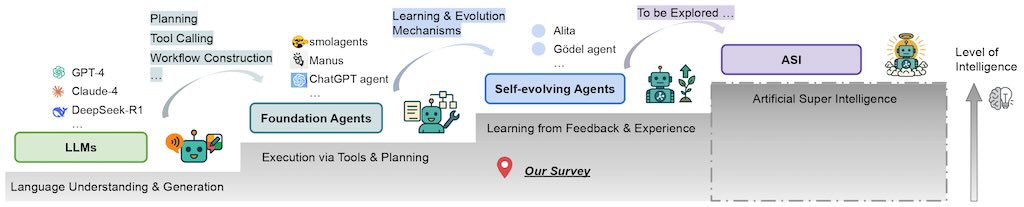
自我進化代理調查:邁向超級人工智慧之路
一個 GitHub 倉庫,用於記錄與推理相關的論文
原来写一个 AI Agent 这么简单

Google A2A + MCP = 分布式Agents网络

Google’s A2A Protocol (agent to agent)
